

A television screen collects dust, fingerprints, and small marks through everyday use. Keeping the display clean improves viewing comfort and helps maintain the appearance of your entertainment system. However, modern television screens are delicate and require careful handling. Proper TV Screen Cleaning techniques can help remove dirt without scratching the display or damaging its protective coating.
Whether you own an LED, LCD, OLED, or Smart TV, following the correct cleaning methods can help keep your television looking its best.
Why Is Proper Television Screen Cleaning Important?
Television screens are designed with sensitive display surfaces that can be damaged by rough materials, excessive pressure, or unsuitable cleaning chemicals.
Dust and fingerprints can make the picture appear less clear and affect your overall viewing experience. Regular gentle cleaning helps maintain the display’s appearance and prevents dirt from building up.
Using appropriate cleaning materials is especially important for modern flat-screen televisions because their surfaces may have special protective coatings.
1. Turn Off and Unplug Your Television
Before cleaning your television, switch it off and disconnect the power cable.
A turned-off screen makes dust, fingerprints, and smudges easier to see. Allow the television to cool down before starting the cleaning process.
Unplugging the device also provides an additional safety precaution while cleaning its exterior.
2. Use a Soft Microfiber Cloth
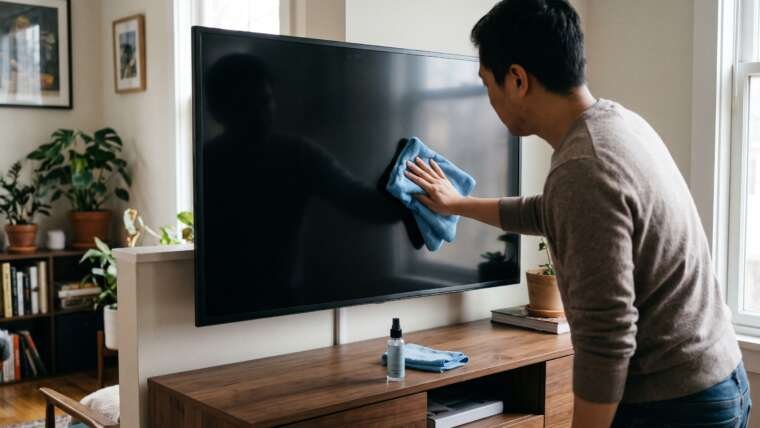
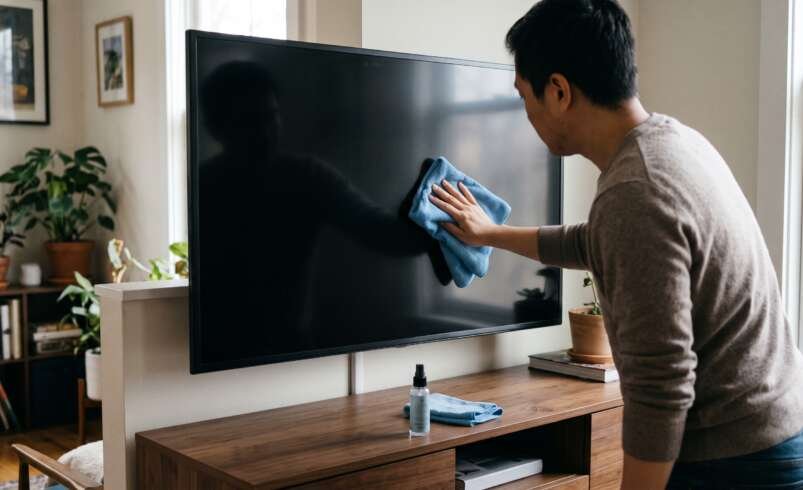
A microfiber cloth is one of the safest tools for cleaning modern television screens.
Its soft material helps remove dust and light fingerprints without creating unnecessary scratches.
Follow these simple steps:
- Choose a clean, dry microfiber cloth.
- Gently wipe the screen using light pressure.
- Move the cloth in smooth, circular motions or follow the manufacturer’s recommended method.
- Avoid using rough towels, tissues, or paper products.
- Use a separate cloth for cleaning the television frame.
Never press hard against the display because excessive pressure can damage delicate screen components.
3. Avoid Spraying Liquid Directly on the Screen
One common cleaning mistake is spraying water or cleaning solutions directly onto a television screen.
Liquid can enter the edges of the display and potentially damage internal electronic components.
If the manufacturer permits damp cleaning, lightly moisten a microfiber cloth with an approved cleaning solution. The cloth should never be wet or dripping.
Always check your television manufacturer’s instructions before using any liquid cleaner.
4. Avoid Harsh Cleaning Chemicals
Many household cleaning products contain ingredients that can damage television screen coatings.
Avoid using:
- Window cleaning sprays.
- Household detergents.
- Ammonia-based cleaners.
- Strong alcohol-based solutions unless specifically approved.
- Abrasive cleaning powders.
- General-purpose chemical sprays.
Choose only cleaning products recommended by your television manufacturer.
Using unsuitable chemicals can leave marks, damage protective coatings, or affect display quality.
5. Remove Fingerprints Carefully
Fingerprints are common on television screens, especially in homes with children.
To remove them, first use a clean, dry microfiber cloth. Wipe the affected area gently without applying pressure.
If marks remain, follow the manufacturer’s instructions for using an approved screen-cleaning solution.
Avoid repeatedly rubbing the same spot because unnecessary friction may affect the screen surface.
6. Clean the Television Frame and Ventilation Areas
Cleaning should not be limited to the display. Dust can also collect around the television frame, buttons, ports, and ventilation openings.
Use a soft cloth to clean the exterior carefully. For ventilation areas, follow the manufacturer’s instructions and avoid pushing dust deeper into the device.
Keeping ventilation openings clear helps support proper airflow and reduces the risk of heat buildup.
7. Keep Your Cleaning Materials Separate
Using the same cloth for different household surfaces can transfer dust, grease, and small particles onto your television screen.
Keep a dedicated microfiber cloth specifically for your electronic displays.
Wash reusable cleaning cloths according to their care instructions and make sure they are completely clean and dry before using them again.
This simple habit helps prevent accidental scratches and unwanted marks.
8. Clean Your Television Regularly
You do not need to clean your television screen every day. Cleaning frequency depends on your household environment and how quickly dust accumulates.
For most homes, checking the screen regularly and cleaning it whenever visible dust or fingerprints appear is a practical approach.
If your television is located near a kitchen, open window, or dusty area, it may require more frequent attention.
Common Television Cleaning Mistakes to Avoid
Even simple cleaning mistakes can cause unnecessary damage to a television display.
Some important things to avoid include:
- Cleaning the screen while the television is running.
- Applying excessive pressure.
- Using rough fabrics or paper towels.
- Spraying cleaning liquids directly onto the display.
- Using unapproved chemical products.
- Cleaning with dirty or dusty cloths.
- Allowing moisture to enter the television edges.
Following the correct cleaning instructions helps protect your investment and maintain the display’s condition.
When Should You Seek Professional Assistance?
Some screen problems cannot be solved through ordinary cleaning. Permanent lines, dark patches, flickering, discoloration, or internal moisture may indicate a technical issue.
If you notice these problems, contact a qualified television technician rather than attempting to open or repair the display yourself.
Professional assistance can help identify the cause and prevent additional damage.
Conclusion
Cleaning your television screen safely is a simple but important part of electronic device maintenance. Using a soft microfiber cloth, avoiding harsh chemicals, unplugging the television, and following manufacturer instructions can help protect its delicate display.
Regular care also improves the appearance of your entertainment system and helps maintain a comfortable viewing experience. With the right cleaning habits, you can keep your television screen clean and in good condition for years to come.