

Introduction
Cloud computing has transformed the way businesses build and deliver live video streaming services. Instead of investing in expensive on-premise servers and complex infrastructure, organizations can now leverage cloud technologies to create scalable, secure, and high-performance live streaming web applications. Whether you’re launching an OTT platform, hosting virtual events, broadcasting live sports, delivering online education, or streaming corporate meetings, a cloud-based architecture ensures reliable video delivery to viewers worldwide.
A cloud-based live video streaming web application provides flexibility, automatic scalability, global content distribution, and reduced operational costs. By combining cloud infrastructure with adaptive bitrate streaming, Content Delivery Networks (CDNs), real-time transcoding, and advanced security, businesses can deliver seamless live streaming experiences across desktops, mobile devices, tablets, Smart TVs, and connected devices.
This guide explains how to build a cloud-based live video streaming web application, the technologies required, essential features, architecture, security considerations, and best practices for delivering high-quality streaming at scale.
What Is a Cloud-Based Live Video Streaming Web Application?
A cloud-based live video streaming web application is a platform that captures, processes, transcodes, stores, and delivers live video entirely through cloud infrastructure. Instead of relying on physical servers, the application uses cloud computing resources to automatically scale based on viewer demand.
Cloud streaming platforms allow organizations to broadcast live events globally while maintaining excellent video quality, high availability, and low latency. Users can watch live content from any internet-connected device without installing additional software.
Cloud deployment also simplifies maintenance, software updates, monitoring, and disaster recovery, making it the preferred choice for modern streaming businesses.
Why Choose Cloud for Live Video Streaming?
Cloud infrastructure offers significant advantages compared to traditional server-based deployments. It provides virtually unlimited scalability, enabling businesses to accommodate sudden spikes in viewership during live events without performance degradation.
Additional benefits include:
- Automatic infrastructure scaling
- Reduced hardware investment
- Global content delivery
- High availability
- Faster deployment
- Lower maintenance costs
- Improved disaster recovery
- Better performance monitoring
- Simplified software updates
These advantages allow businesses to focus on creating engaging content while the cloud handles infrastructure management.
Key Features of a Cloud-Based Live Streaming Web Application
Cloud-Native Architecture
A cloud-native architecture is designed specifically for cloud environments. It uses microservices, containers, APIs, and orchestration platforms to improve flexibility and scalability.
Benefits include:
- Independent service deployment
- Faster feature updates
- Better fault tolerance
- Easy horizontal scaling
- Improved system reliability
Cloud-native applications can efficiently handle increasing workloads without disrupting ongoing live streams.
Adaptive Bitrate Streaming
Internet speeds vary widely across users and regions. Adaptive Bitrate Streaming (ABR) automatically adjusts video quality based on available bandwidth and device capabilities.
This ensures:
- Smooth playback
- Minimal buffering
- High-quality viewing
- Improved user satisfaction
- Reduced playback interruptions
Protocols such as HLS and MPEG-DASH are commonly used for adaptive streaming across multiple devices.
Auto Scaling
One of the biggest advantages of cloud computing is automatic resource scaling. During major live events, thousands of viewers may join within minutes.
Auto Scaling automatically adds or removes computing resources based on:
- CPU utilization
- Network traffic
- Viewer count
- Streaming load
- Storage requirements
This helps maintain consistent performance while optimizing infrastructure costs.
Global Content Delivery Network (CDN)
A CDN distributes live video streams through geographically distributed edge servers located closer to viewers.
Benefits include:
- Faster video delivery
- Reduced buffering
- Lower latency
- Global audience reach
- Improved reliability
A CDN ensures viewers receive high-quality streams regardless of their geographic location.
Real-Time Video Transcoding
Different devices require different video formats and resolutions. Cloud-based transcoding automatically converts incoming video into multiple quality levels.
Supported resolutions may include:
- 240p
- 360p
- 480p
- 720p
- 1080p
- 4K
This enables adaptive bitrate streaming and ensures compatibility across various devices and network conditions.
Low-Latency Streaming
Interactive events require minimal delay between broadcasters and viewers. Cloud-based streaming platforms support technologies such as WebRTC and Low-Latency HLS to deliver near real-time video.
Low-latency streaming enhances:
- Live sports
- Online gaming
- Virtual events
- Auctions
- Webinars
- Interactive education
Reducing latency improves audience engagement and overall viewing experience.
Secure Video Delivery
Content protection is essential for premium streaming services. Security features should include:
- DRM integration
- AES encryption
- Token authentication
- Secure playback URLs
- Geo-blocking
- Domain restrictions
- Dynamic watermarking
These measures help prevent piracy and unauthorized content distribution.
Technology Stack
Frontend Technologies
Build responsive user interfaces using modern JavaScript frameworks such as:
- React
- Next.js
- Angular
- Vue.js
The frontend should support responsive layouts, fast loading times, and compatibility across browsers and devices.
Backend Technologies
The backend manages user authentication, stream scheduling, metadata, analytics, notifications, and payment processing.
Popular backend technologies include:
- Node.js
- Python
- Java
- Go
A microservices architecture improves scalability and simplifies maintenance.
Cloud Infrastructure
Choose a cloud provider that offers reliable compute, storage, networking, and managed services.
Key cloud services include:
- Virtual machines
- Kubernetes
- Object storage
- Load balancers
- Managed databases
- Serverless functions
Cloud infrastructure enables automatic scaling and high availability.
Streaming Protocols
Select protocols based on your streaming requirements:
| Protocol | Purpose |
| RTMP | Stream ingestion |
| HLS | Multi-device delivery |
| MPEG-DASH | Adaptive streaming |
| WebRTC | Ultra-low latency |
| SRT | Reliable contribution feeds |
Combining these protocols ensures efficient video delivery across different scenarios.
Step-by-Step Development Process
Step 1: Define Business Requirements
Before development begins, identify:
- Target audience
- Expected concurrent viewers
- Supported devices
- Video quality requirements
- Monetization strategy
- Security needs
A clear roadmap helps avoid unnecessary complexity during implementation.
Step 2: Design the Cloud Architecture
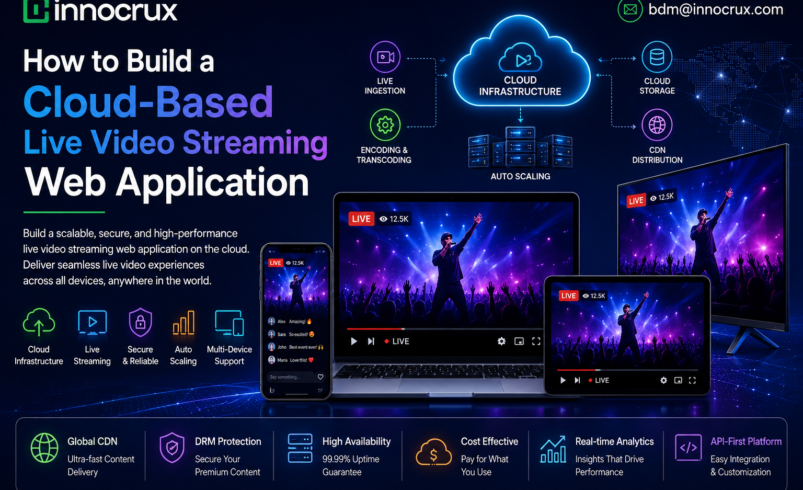
A robust architecture should include:
- Load balancers
- Streaming servers
- Encoding services
- CDN
- Authentication services
- Monitoring tools
- Databases
- Cloud storage
Designing for scalability from the start ensures smooth performance during audience growth.
Step 3: Build the User Interface
Develop responsive pages for:
- Home
- Live events
- Categories
- Search
- User accounts
- Subscription management
- Video playback
Optimize the interface for desktops, smartphones, tablets, and Smart TVs.
Step 4: Implement Video Processing
Integrate live encoding and transcoding pipelines to generate multiple video resolutions in real time.
GPU-accelerated encoding improves efficiency and reduces processing latency, ensuring faster stream availability.
Step 5: Integrate Cloud Storage
Store recorded live sessions, thumbnails, subtitles, and metadata using scalable cloud object storage.
Cloud storage offers:
- High durability
- Automatic backups
- Easy content retrieval
- Cost-effective storage
This also enables viewers to access archived content as Video-on-Demand (VOD).
Step 6: Implement Security
Protect your platform by enabling:
- DRM
- Secure authentication
- HTTPS encryption
- Watermarking
- Tokenized playback
- Geo-restrictions
- Role-based access control
Strong security builds trust with content owners and subscribers.
Step 7: Monitor and Optimize
Continuously monitor:
- Stream health
- Viewer analytics
- Buffering rates
- CDN performance
- Server utilization
- Error logs
Real-time monitoring allows quick issue resolution and improves platform reliability.
Monetization Strategies
Cloud-based streaming platforms can support multiple revenue models, including:
- Subscription (SVOD): Monthly or yearly plans for premium content.
- Pay-Per-View (TVOD): Charge users for individual live events.
- Advertising (AVOD): Generate revenue with pre-roll, mid-roll, and display ads.
- Freemium: Offer free content while charging for premium features.
- Corporate Licensing: Provide streaming solutions for enterprise clients.
Supporting multiple monetization models increases revenue opportunities and appeals to a broader audience.
Best Practices
To ensure long-term success:
- Use cloud-native architecture.
- Deploy a global CDN.
- Enable adaptive bitrate streaming.
- Optimize encoding for multiple resolutions.
- Automate infrastructure scaling.
- Monitor system performance in real time.
- Secure content with DRM and encryption.
- Test across browsers, devices, and network conditions.
- Implement disaster recovery and backup strategies.
- Continuously optimize based on analytics and user feedback.
Why Choose Innocrux?
Innocrux provides a comprehensive cloud-based live video streaming solution designed for businesses that require scalability, security, and exceptional performance. The platform enables organizations to launch branded streaming services quickly while supporting millions of viewers worldwide.
Innocrux Features
- White-label live streaming platform
- Cloud-native infrastructure
- Adaptive bitrate streaming
- Low-latency live streaming
- Multi-device compatibility
- Secure DRM protection
- AI-powered analytics
- Real-time monitoring
- Flexible monetization options
- API integrations
- Automatic cloud scaling
- Global CDN support
- VOD and live streaming management
With Innocrux, businesses can focus on creating engaging content while the platform manages the complexities of cloud infrastructure, video delivery, security, and scalability.
Conclusion
Building a cloud-based live video streaming web application is the most effective way to deliver reliable, high-quality live video experiences to global audiences. By leveraging cloud-native architecture, adaptive bitrate streaming, auto scaling, CDN integration, and robust security, businesses can create a platform that performs efficiently under any level of demand.
Whether you’re launching an OTT service, broadcasting live sports, hosting virtual events, or delivering online education, a cloud-based approach provides the flexibility, scalability, and performance needed for long-term success. With an end-to-end solution like Innocrux, you can accelerate development, reduce operational complexity, and deliver seamless live streaming experiences across every device.