

Hitting delete won’t save you. Real data destruction means shredding metal and magnetic wiping. Here is my 20-year veteran truth about keeping old hardware from ruining your business for good.
I smell ozone and stale dust. That is the smell of a cheap hard drive drill-out operation in a humid warehouse. It makes me absolutely sick.
Over two decades in this brutal business, I’ve spent countless hours dragging heavy, outdated tech out of basement server rooms just to keep careless business owners out of federal prison for privacy violations. People hand me a dusty old laptop and say, “I deleted everything.”
I just sigh.
Hitting the delete key does not mean actual data destruction. Not even close. Your files still sit perfectly intact on those magnetic platters. Anyone with free downloadable software and ten minutes of spare time can pull up your tax returns, client lists, and passwords. Terrifying. But entirely true. Real data destruction requires physical force.
Stop Believing the Format Drive Myth
Formatting a drive just removes the map. The city is still there. I see office managers format a drive and toss the machine in the trash. Huge mistake.
Software Wiping Isn’t Enough
People run a quick wipe tool and call it a day. They think they are safe. You aren’t. Bad sectors on old drives hide old data. The software skips right over the bad sectors. A determined identity thief knows exactly how to read them.
Total Physical Shredding
The only way I sleep at night is physical destruction. Shred it. Turn that solid metal block into tiny metallic confetti. Hear the crunch. That violent noise is the sound of absolute security. Nothing survives the teeth of an industrial shredder.
The Reality of Computer Recycling
Computer recycling is a dirty game if you hire amateurs. I see piles of old desktop towers stacked in open loading docks all the time. Ripe for the picking.
Here’s the thing. Do not trust a guy with a rusty pickup truck offering to haul away your office gear for pocket change. They rip out the valuable copper and toss the hard drives straight into a landfill. Anyone walking by can scoop up your company secrets. Proper computer recycling requires documented, certified data destruction. You need a legally binding chain of custody. Period.
SSDs Changed The Data Destruction Game
Solid-state drives ruined the old ways of doing things.
Magnets Do Not Work Anymore
Old guys like me used to degauss drives. Big heavy magnets. They wiped the magnetic charge clean. You’d hear a loud THUNK, and the drive was completely dead.
But wait. SSDs don’t use magnets. They use tiny flash memory chips. Degaussing an SSD does exactly nothing. You just gave your perfectly intact data to a stranger.
Punching and Shredding SSDs
You have to physically destroy those silicon chips. We use specialized micro-shredders now. They chew the plastic and silicon into fine dust. If you leave a single chip intact, a hacker can pull hundreds of files off it.
Nightmares in Server Recycling
Server rooms are the absolute worst. You upgrade your rack. Now you have heavy, hot, dust-clogged metal sitting in a dark corner. Server recycling isn’t just about moving heavy boxes. It involves massive arrays of hidden drives.
RAID Drives Hold Your Secrets
I pulled twelve drives from a discarded server last year. The IT guy swore he wiped the array. He forgot the hot spares. Those dormant spares held an exact mirror of the company payroll database. Absolute mess. But fixable.
We took those drives straight to the shredder. Every single one. No exceptions. That is real data destruction. Never let an IT guy tell you the server is clean until you see the shredded metal yourself.
The Hidden Dangers in Copiers
Yeah, office copiers. You didn’t think about that, did you?
Your Tax Returns on a Copier
Modern office copiers have hard drives inside them. They store a digital image of every single document you ever scanned. I bought a used copier from a liquidator once. I pulled the drive. Guess what? I found 400 pages of medical records from a local dentist. I called the guy. He went completely pale. He had no idea.
Rip that hard drive out before the machine leaves your building. Feed it to the shredder. Never let a smart machine leave your office with its brain still inside it.
Getting Rid of the Junk Safely
You have junk. You need it gone. But you want it done right the very first time.
Free E-Waste Drop Off
Look for a free e-waste drop off. But ask hard questions first. What happens to the memory? Who handles the storage devices? Do they shred on-site?
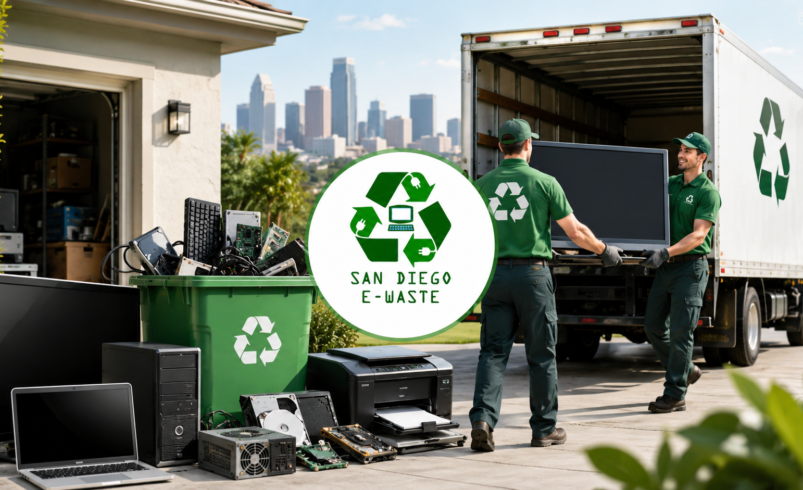
I tell every client this: go to the professionals. Use a trusted service like San Diego E Waste Free Pick Up Drop off. They know exactly what they are doing. They handle the messy, heavy stuff so you do not have to break your back or risk your reputation.
Trust Local San Diego Experts
If you live around here, you have zero excuses for sloppy disposal. None.
Where to Take Your Electronics
Take your gear straight to the source. Pack up your trunk and head over to San Diego E-Waste, 645 Marsat Ct # B, Chula Vista, CA 91911, United States.
Drop It Off and Walk Away
I’ve stood in that very facility. The smell of clean, processed metal. It is the real deal. They take data destruction incredibly seriously. Your hard drives meet the shredder. Your old servers get stripped and recycled safely.
Don’t gamble with your company’s reputation just to save an hour of your afternoon. Certified data destruction is the only way to bury your digital ghosts for good. Make the right choice today before your files end up in an alleyway.
5 Fast FAQs on E-Waste Security
What is the most secure method of data destruction? Physical shredding. Destroying the hard drive into tiny metal pieces guarantees absolutely no one can recover your files. Software wipes can fail. Blades do not.
Can I just hit factory reset before computer recycling? No. Factory resets leave your old data buried in unallocated drive space. Free recovery software off the internet can pull it right back up in minutes.
Does server recycling include destroying the hard drives? Only if you hire certified professionals. Always demand a physical certificate of destruction for every single drive pulled from your server racks.
Where can I find a secure free e-waste drop off? Look for certified local facilities. In Southern California, drop off your gear directly at trusted local recycling centers like the Chula Vista location for safe, legal processing.
Do solid state drives require different data destruction? Yes. Magnets cannot erase SSDs. The physical memory chips must be completely punctured or shredded into fine dust to stop data thieves in their tracks.